
02 / 076 min readUpdated November 9, 2026
The spectral crossfader: a bass swap without touching the EQ
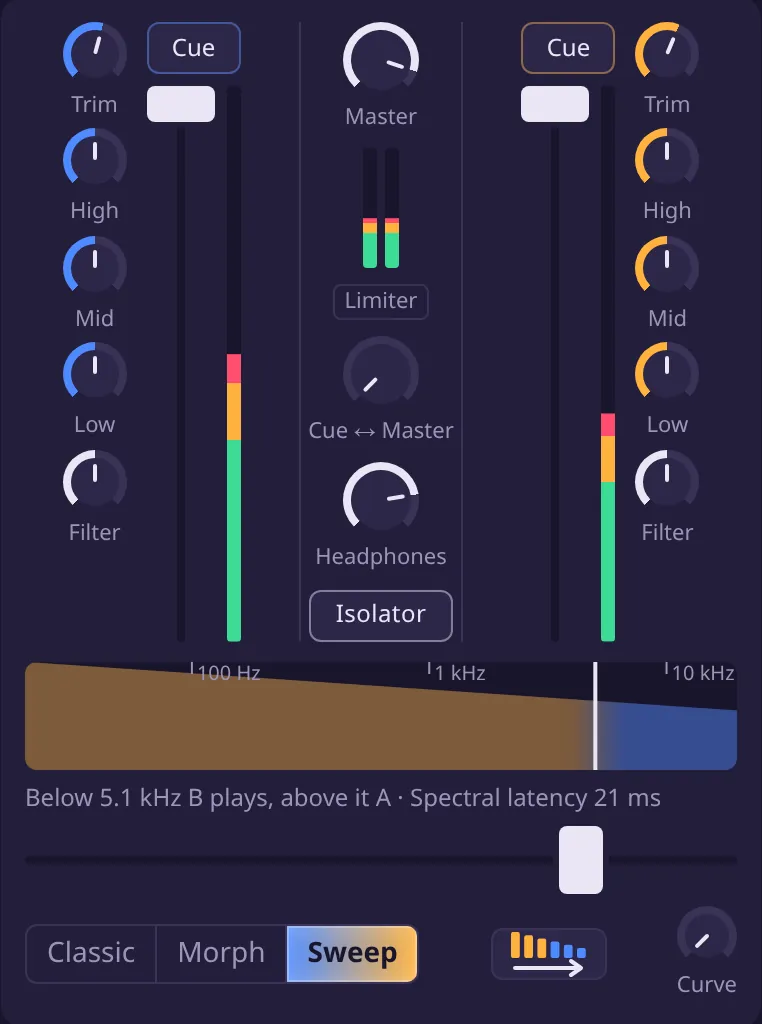
A normal crossfader turns one track down and the other up. The spectral crossfader in VibeField DJ works frequency by frequency instead. In Sweep mode the fader itself does the bass swap you would normally do with two EQ knobs, and the field above it shows you what is happening as you move it.
01Three modes, one fader
Under the crossfader you choose the mode: Classic, Morph or Sweep. You can switch while the music is playing. In every mode, fader fully left is exactly deck A and fully right is exactly deck B. Only the way between the two changes.
- Classic is a normal volume crossfade.
- Morph blends the spectra of both tracks bin by bin, so their timbres melt into each other.
- Sweep hands the spectrum over from one deck to the other, starting with the lows or with the highs.
02Sweep: the bass swap on the fader
In Sweep, a split frequency travels across the spectrum as you move the fader. Below it you hear one deck, above it the other, with a soft one-octave transition and constant power, so the overall level stays steady.
The small button next to the mode switch sets the direction: lows first or highs first. With lows first, the first part of the fader movement hands over the kick and bass of deck B while the melody of deck A is still playing. That is a bass swap, and both hands stay free for something else.
- Sync the two decks and select Sweep with the direction set to lows first.
- Start deck B on a phrase and keep the crossfader on A.
- On the first beat of the new phrase, push the fader to about a third. B now owns the low end and A still carries the top.
- Keep moving slowly toward B over the next bars to hand over the mids and highs.
03Morph: blending timbres
Morph does not split the spectrum at one frequency. It blends the magnitudes of both tracks in every frequency bin. Halfway, the result sounds less like two songs stacked on top of each other and more like a single sound in between. It also never falls into silence when one deck is quiet.
Morph shines with long, atmospheric blends: two pads, two breakdowns, an ambient intro over an outro. With two full drum tracks it can sound smeared; use Sweep there.
04Read the field display
The field above the crossfader is a live picture of the spectrum, with bass on the left and treble on the right, colored by which deck each frequency comes from. Its brightness follows the level of each deck. Under it, a line of text says exactly what you hear, such as Below 180 Hz B plays, above it A in Sweep, or the percentages of A and B in Morph.
The spectral modes need a short analysis window, so the label also shows the spectral latency in milliseconds.
05The curve and when to use which mode
The Curve knob shapes the Classic fade: from a smooth, constant-power blend to a sharp scratch cut, where each side stays at full volume until the very edge. In that case the field label reads Classic with scratch curve.
A simple rule: Classic with a sharp curve for scratching and quick cuts, Sweep for house, techno and anything with a steady kick where you want a clean bass swap, and Morph for long blends of melodic or ambient material.
Frequently asked
Do I still need the EQs with the spectral crossfader?
Not for the bass swap; Sweep handles that on the fader. The EQs and the Isolator remain useful for shaping a track or cutting a band completely.
Can I use Morph and Sweep from a MIDI controller?
Yes. Your controller's crossfader drives whichever mode is selected, and the mode switch, sweep direction and curve are actions you can assign in the controller workshop.
Are crossfader moves included when I record a set?
Yes. Mode changes and every fader movement are part of the set recording and render exactly as you played them.