
03 / 077 min readUpdated November 9, 2026
Harmonic mixing with the Camelot wheel
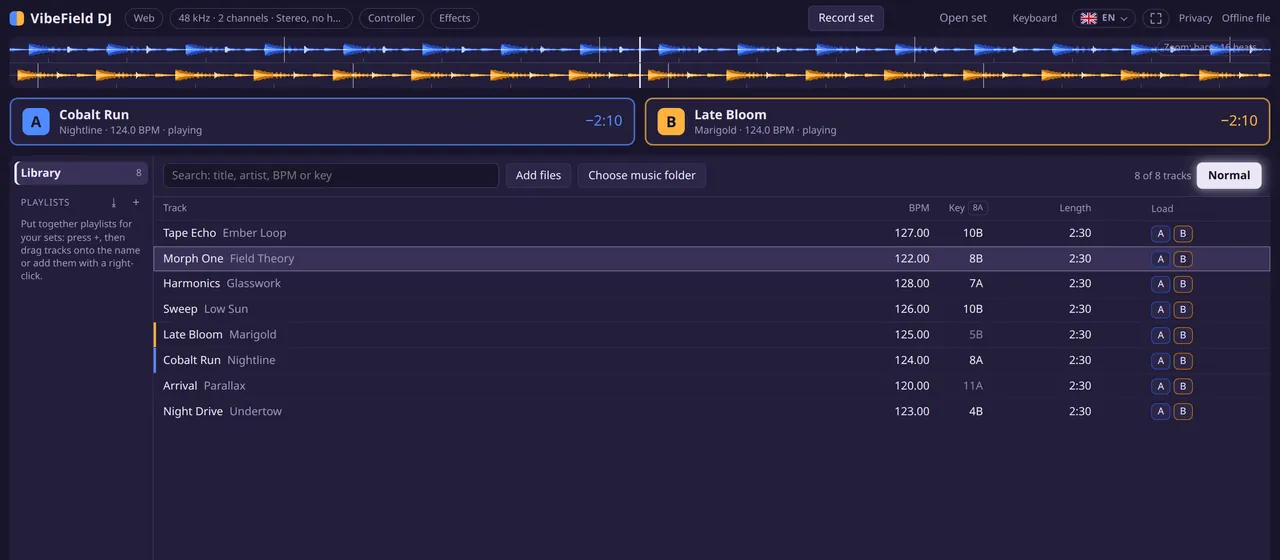
Two tracks in compatible keys can overlap for a long time without clashing. VibeField DJ detects the key of every track during analysis and shows it in Camelot notation, so you can choose the next track by looking at a number and a letter.
01The Camelot wheel in three rules
The Camelot wheel puts the 24 keys on a clock: numbers 1 to 12, with A for minor keys and B for major keys. 8A is A minor, 8B is C major. From the key you are in, these moves almost always sound good:
- Same code: 8A to 8A. The safest mix.
- One step around the wheel: 8A to 7A or 9A. A gentle lift or drop.
- Same number, other letter: 8A to 8B. From minor to the relative major, or back. A change of mood with the same notes.
02Find the key in the library
The library has a Key column. A small field in its header switches the notation between 8A, Am and 1m; choose the one you think in. The search box finds keys too, so typing a code shows every track in that key.
Key detection is an estimate. When the analysis is not sure, the tooltip on the key says uncertain, so trust your ears on those. The deck shows the key as well. Without Keylock, it shows the key that is actually sounding at the current tempo, because speeding a track up also raises its pitch.
03Keylock: change the tempo, keep the key
Every deck has a Key button next to the pitch fader. With Keylock on, you can change the tempo and the key stays where it is. That matters for harmonic mixing: a track pushed up by several percent can drift into a different key, and Keylock pulls it back.
To change the key on purpose, the Pitch shift effect shifts a deck by semitones without changing the tempo. That can bring a track that is one step off onto the next track’s key.
04Let the playlist find a mix order
Create a playlist with the + next to the list, then drag tracks onto its name or add them with a right-click. In Sort … you can sort by BPM, by Key (circle of fifths), by title or by artist, or choose Mix order (key + tempo).
The mix order starts with the slowest track and lines up the rest so that neighbors have compatible keys and the tempo rises gently. Steps up in tempo are preferred over steps down, half and double time count as a match, and tracks that haven't been analyzed yet go to the end. Think of the result as a first draft: rearrange it by dragging or with Alt + ↑ ↓.
- Alt+↑ ↓
- Move tracks within the playlist
- Ctrl+F
- Search by title, artist, BPM or key
- Ctrl+Z
- Undo
05Take playlists to other software with M3U8
A playlist’s menu has Export (M3U8). The paths in the file are relative to your music folder, so if you put the file there, other DJ programs find the tracks too. Import playlist (M3U/M3U8) brings playlists from other software in. Tracks that are not in the library yet are marked, and they appear once you open the music folder or drag in the files.
Frequently asked
What does 8A mean?
It is Camelot notation for A minor. The number is the position on the wheel and the letter is minor (A) or major (B). In VibeField you can switch the display to Am or 1m.
Does Keylock change the sound?
Keylock keeps the pitch steady while the tempo changes. With it off, the track behaves like vinyl: faster also means higher.
Can I sort a whole playlist by key automatically?
Yes. Mix order (key + tempo) arranges the playlist so that neighboring tracks have compatible keys and the tempo rises gently. Key (circle of fifths) simply sorts by key.